 alt Hacker News
Group policy just sets registry keys. That's nothing you can't do any other way. The important bit is the inertia of 30 years of Windows subsystems and integration with Active Directory and 3rd party Windows ecosystem software all being written to expose internal config and look to registry keys for the settings.
For the first part, Group Policy (GPO) can set the screen to lock after 2 minutes of inactivity, say, which works because there are Windows subsystems built to look for a reg key for their config, and policy templates exposing that config in the GUI management tools. Or group policy configures which security group can "logon as a service" which works because Windows has system-wide and domain-wide pervasive Access Control Lists (ACLs). GPO configures that Background Intelligent Transfer Service (BITS) should limit its bandwidth use, which works because Windows Updates use BITS. Or sets the machine-wide SSL cipher order, because Windows software uses system-wide schannel not OpenSSL. Or GPO sets what your default printer will be and that's only useful because decades of 3rd party Windows software was written to use the standard Windows printer dialog, or User Documents path, or whatever.
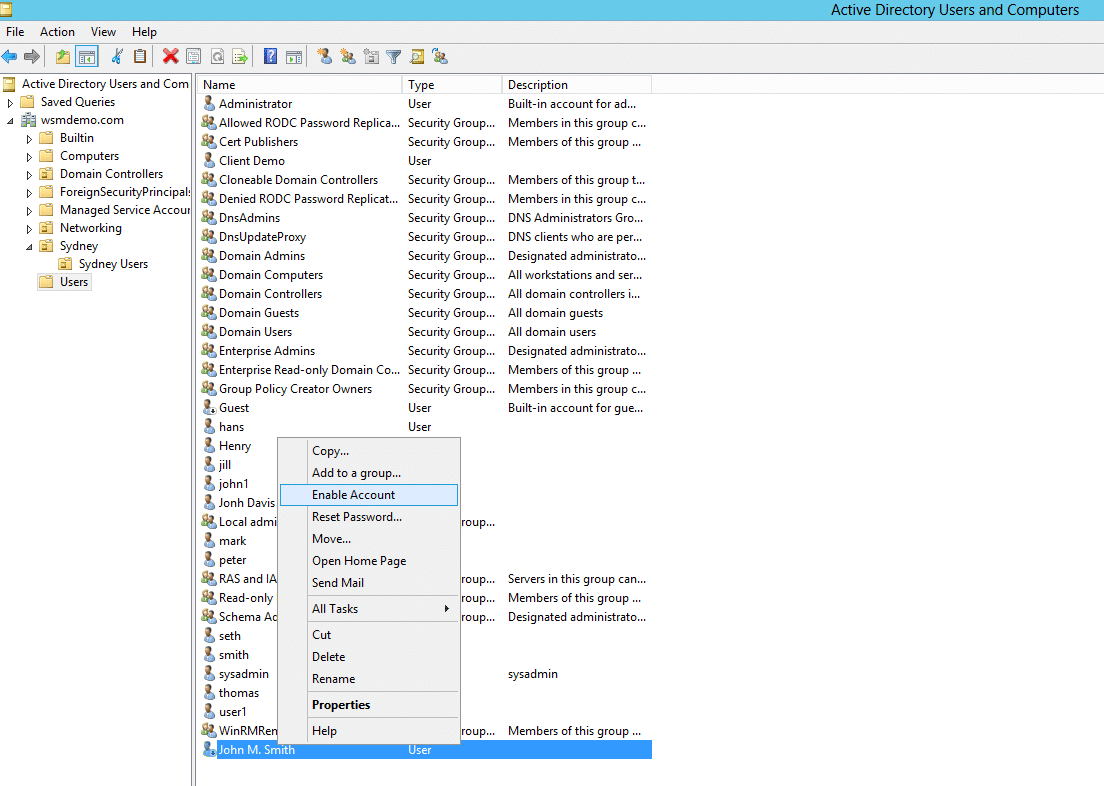
For the second part, Active Directory is a tree-shaped organization tool; in screenshot[5] that I quickly Googled, the tree on the left has a folder named "Sydney" and below that "Sydney Users"; this lets sysadmins organise the company computer accounts, user accounts, and security groups by whatever hierarchy makes sense for that company - e.g. by country, office, team, department, building floor, etc. Then Group Policy overlays on that structure, and the policies are composable.
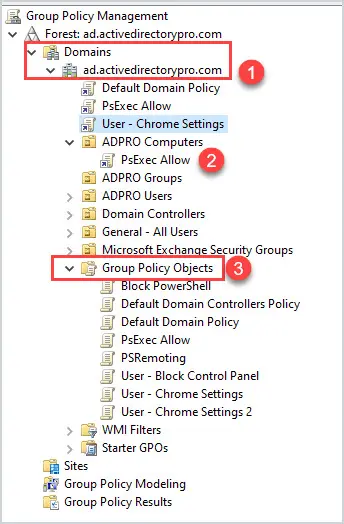
e.g. in this basic screenshot of the group policy manamement GUI[6] it's showing at the bottom a list of all group policy configurations that have been made in a domain such as "Block PowerShell", and higher up it shows the policy "PsExec Allow" has been linked inside the "ADPRO Computers" folder. So users and computers in that folder in AD, will get those policies applied. In screenshot[7] you can see a basic example showing corporate computers getting machine-wide settings, corporate users getting user-level MS Office config, and Executives get settings that nobody else gets. (This echoes the registry having separate HKEY_LOCAL_MACHINE and HKEY_CURRENT_USER subtrees). Screenshot[8] shows the relatively tidy GUI on the right for seeing which settings have been configured in a policy.
If you apply more than one GPO to a folder, the users/computers will get the all the policy settings combined. This is often what people complain about when logging on to a corporate Windows machine takes ages, btw. You can filter GPOs on a case-by-case basis to build patterns like "apply this machine-wide policy to all computers in the Sydney folder which are members of the WarehouseComputer security group" or "apply these logon-settings to employees in New York who are members of Finance and logging onto a laptop". So companies which have been around for years can have really (messy) big and intricate designs which would be a lot of work to migrate.
3rd party programs can release XML files which plug into the GPO management, and the programs were written to expect to be configured by registry keys so they can pick up those settings; there are templates for configuring FireFox[1], Chrome[2] Adobe Acrobat[3], Word, Excel, Office[4], VMWare Horizon, Lenovo Dock Manager, Zoom, RealVNC, LibreOffice, Citrix, FoxIT Reader, and so on. The more enterprisey a tool is, the more likely it will plug into that ecosystem. Then all kinds of 3rd party reporting and auditing tools look there to see if your company is compliant with this or that; the whole thing is integrated with Windows' domain-wide ACLs so you can give some admins permissions to view or edit just their regional subset of this.
As usual the lockin is not that they do something amazing that nothing else can do, the lockin is that Windows domains have been around in this format for 30 years since NT4 and Windows 2000, and it has huge inertia, familiarity, is deeply embedded in a lot of companies, you can easily and cheaply hire lots of people who know how to use and manage it, you can send screenshots of it to auditors and they understand it, if you don't know how but you have a bit of (oldschool) Windows experience then clicking around will get you the basics, you can buy 3rd party auditing software that will send you a management friendly report with green ticks saying almost everything is fine but you should change this setting for security...
[Yes of course you can build your own custom replacement for every single thing, just like you can build your own custom replacement for any software; it's "just" ldap and kerberos and dns and some scripts and site-to-site policy replication and management tools und und und].
[1] https://support.mozilla.org/en-US/kb/customizing-firefox-usi...
[2] https://support.google.com/chrome/a/answer/187202?hl=en
[3] https://www.adobe.com/devnet-docs/acrobatetk/tools/DesktopDe...
[4] https://www.microsoft.com/en-us/download/details.aspx?id=490...
[5] https://www.windows-active-directory.com/wp-content/uploads/...
[6] https://activedirectorypro.com/wp-content/uploads/2022/09/gp...
[7] https://www.varonis.com/hs-fs/hubfs/blog%20posts/Group%20Pol...

[8] https://redmondmag.com/articles/2016/01/12/~/media/ecg/redmo...