 alt Hacker News
Ask HN: What is your (AI) dev tech stack / workflow?
Hello, happy Friday!
I am looking to do some in-person "developer boot-up" workshops, and seek your suggestions for "modern tooling".
The background of the participants range from motivated newbie ("I heard you can make your own app with AI!") to existing software developers who want to get up to speed on modern development for the purposes of building stuff, and getting jobs where AI tools are being used.
For those who have been doing software development & "tech" lately using AI tools, and feel they have a great setup & flow - I would love to hear what your dev setup is, what tools you're using and what workflow has been working best for you (and your team).
// My Background
I have been programming / building for 20+ years, but have not been using AI tools much (aside from hitting up LLM APIs on a few projects).
I value open-source, and aim for long-term quality and supportability. Techniques like test-driven development (TDD), using proven / well documented tools, customer-centric development (often pairing with clients), make it easy to do the right thing. If you are familiar with Pivotal Labs, agile & XP - that's the style.
These are some of the Upcoming uses-cases for the workshop, and my own personal "IT backlog":
- Create a static "one pager" personal/professional website
- Setup a Blog / Static site generator (Pelican), create a simple but stylish theme
- Create a simple web app / backend API (FastAPI) tool - form-based calculator, convert X data to PDFs, etc.
- Figure out how to have SyncThing autosync the home folder of 3 Linux computers in the house
- Backup & archive the photos & video from my iPhone
// Tech stack I am currently using:
- Operating system: Linux Mint Debian (LMDE)
- Editor: VSCodium
- Code: Python, HTML/CSS
- Server platform: Amazon AWS
I am guessing that most workshop participants will be using MacBooks & Windows computers - but a few are on Linux, as I recently did a "Linux install party".
I haven't used any "AI harnesses", agents or anything like that - but curious what's a good starting point to take best advantage of these tools.
Thanks for sharing the knowledge!
// JRO
Comments
I've shifted to a "slow code" approach with AI, treating it more like a design partner than a code generator.
I mostly do TDD with TypeScript. I write the test, write the code myself (sometimes with the help of LLM), and then hand it to the LLM. Instead of asking it to write things for me, I use it to find edge cases, check if it's leak-proof, and verify efficiency.
For architecture questions, I debate with it for a while. I almost never ask for code without conversing 4-5 times first to push back on its assumptions. It's the best rubber-ducking partner I've had.
Personal plug: I wrote more about why/how I use AI to write slow, better code on my blog: https://nabraj.com/blog/ai-write-slow-better-code
I'm biased (I'm the creator) but I use Conductor every day. I've recently switched to Opus 4.8 (fast mode always on) as my default model but swap in GPT-5.5 quite a bit for reviewing Opus's work.
My flow is something like: - Create a new workspace for a specific bug/feature - Ramble into the input box. I use a goose neck microphone and Spokenly (with Parakeet as the model ) for local speech-to-text - Hit enter! I don't use plan mode. - Ask for a review from a different model (⌘⇧R) - Create a PR and run a /babysit loop - Run a local version of the app and click around, do a human review. If the LOC are negative we don't pay much attention to the code. If it's positive we do - Merge!
I often have 3-5 workspaces running like this. There's lots of room for improvement but it's been working quite well for me.
There's lots of ways. You have to upskill through the stages IMO. Write code, write w/ agent, write w/ multi agents, write w/orchestrators.
My way is to just run a giant AI agent factory engine and make the agents full flow do everything. (plan long term, write prd, task, review).
Here's ~4000 commits in last month as an example, i have about ~10k ish including private/work stuff? https://github.com/portpowered/you-agent-factory/commits/mai...
The premise when you get to full automation generally is you go full industral engineering:
1. watch overall flow, improve process via continuous improvement
2. work via checklists and gates.
3. replace process with mechanisms as much as possible (code > agents)
4. optimal throughput is continual testing and iteration (CI, CD), coverage, full e2e tests, mock everything, general best practices really.
decent blog: https://openai.com/index/harness-engineering/
general points:
- build lots of linters
- document literally everything (arch, prd, best practices in repo)
- too many agents at the same time makes lots of code conflicts, so need to consider architecture of code how to maximize concurrency.
I use Claude Code, flow for reusable skills/prompts, and leaf for reading Markdown comfortably in the terminal.
- Claude Code
- flow: https://github.com/RivoLink/flow
- leaf: https://github.com/RivoLink/leaf
- GNOME Terminal
It's a pretty terminal-first workflow.
1) Slow code. Let the agent(s) discover and plan, then launch the swarm on the confirmed implementation steps. 2) Use LSP. If nothing works, usually you can connect it via MCP. I think all coding agents support this by now. 3) Add hooks if you want to stop the coding agent from doing something nasty, or hallucinate and give incomplete output. TDD and any verification tool you can think of are your friends. 4) Skills have been a bit of hit and miss for me, especially with less capable models. So are plugins. If you know how they work, please explain to me.
That way the model doesn't go about "let me grep this specific pattern across a million files again and again" loop and burn your entire weekly budget by Monday at noon.
I'm also curious if anyone has done something cool with memory and context management that doesn't require a custom llama.cpp implementation. I also don't have the heart to let the swarm do it end to end, because LLM generated code with less capable models really does smell, no amount of spec driven or Claude.md filled style guidelines seem to fix it.
I'm a contractor (AWS and web apps), so I get a lot of sometimes-ambiguous requests. I have a five-part workflow via Claude/Codex skills: discovery->implementation planning->implementation->verification->review
Each phase writes to `./.agents/plans/{plan-name}/` in the project root. All in Markdown. That way, the flow is agent-agnostic. Each phase artifact is immutable after being written.
More details:
First, I put all the information that I have (documents, client statements, any code, my own summary, etc.) into a document. Which I pass to the discovery planning skill.
The discovery phase more formally defines the project in terms of functional requirements, non-functional requirements, constraints, risks, and assumptions. This might take a few passes to get everything nailed down.
After that, I being a implementation planning phase using the discovery artifact (`discovery.md`). We define the work in terms of phases, where each phases has various tasks associated with it (all checkboxes). Again, usually requires a few passes.
After that, I have a clear idea of the work needed and can send an estimate to the client. Or, if it's a personal project, get started actually building it. I have another phase for actual implementation.
Verification and review are similarly defined. They can be done by any agent.
Assuming you have a SOTA model - the thing I'd teach them is minimalism.
- Minimal tooling - Minimal system prompt - Folders + files + text
AI driven development has turned the whole development job into knowing what questions to ask + complexity reduction.
First ask the model how to do something / what options there are to do something - not just to do something. Creating moments to teach that is a challenge in itself.
After its answered go tell it to do the thing.
If they're serious though, the next step is to teach them to always ask if there is a simpler alternative with fewer dependencies.
Anything with a too magical UI is going to give them the wrong 'model' in their mind on how to think about the tool.
A bit of a hidden aspect many people seem to miss, the tone you take with the model is absolutely critical. Ask a bunch of psychology questions before having it write javascript or propose a tech stack is going to get you different results.
Finally, the semi obvious hack (and which something like claude will do automatically when in team mode) - have the model talk to another instance of itself. The model can translate your ramblings into coherent specs in the right tone and feeding that back into itself in a new session gets you the good results. Its also part of why the "first write a plan" works because it fills the context with the right tone and clear instructions.
I've dabbled a bit in GitHub Copilot using Claude Opus and Sonnet models via work, but I couldn't shake the thought that we weren't allowed to use this on any of our clients' codebases. Having been a fan of Ollama, I wanted to try something truly local.
First I tried OpenCode but they unexpectedly make external requests (!) even when using Ollama (I noticed when Ollama wasn't properly connected and I still got a title generated).
So I settled for Pi, but I strongly disliked the idea that the agent could, at any point, decide to delete files or exfiltrate .env secrets. So I created Picosa (https://github.com/GreenpantsDeveloper/Picosa), containerizing and sandboxing Pi, with firewall rules such that it could only ever reach the local network (for Ollama), scoped by just the current working directory, and nothing else. Combined with Qwen3.6:35b, it works surprisingly well, and I could ask it to improve itself when run on its own repository.
MacOS, Ghostty, Tmux, Neovim, Workmux[1], OpenCode/Claude Code, and lots of markdowns.
Ghostty with Claude Code. That's pretty much it.
For each new feature, I open a worktree, spar with Claude to work up a gherkin spec with @todo on each story. Each agent pushes commits to a WIP PR in GitHub where I review and leave comments or questions. Once the spec is done we mainly interact on the PR. @todo becomes @wip and @done as the agent progresses. I really like gherkin for agentic engineering, it's very clarifying.
I have about 2-4 agents running at a time. Large test suite, linters and formatters enforced on push.
All I use is codex right now.
I brainstorm with it, create documentation, and generate code. Then review, test and profit.
At the moment I predominantly work with Python and hence PyCharm as the main IDE. However, I've built this plugin https://plugins.jetbrains.com/plugin/31117-agent-cli to render agentic CLIs as an editor tab in PyCharm and also some notification hooks so I don't have to switch windows and it's easy to jump around the code while the agent is doing its work.
Besides that I have a collection of custom skills (plan for JIRA tickets, github PR creation, code review, etc), a set of MCPs (most are for internal tooling) and most of the time I use Claude Code.
I'm using VSCode with Github Copilot (Business) in Agent, and Ask mode with varying LLMs, depending on the complexity of the task. For a specific task, i create a markdown file with the requirements in tandem with the Agent, manually edit it where convenient. And then i let the Agent implement one feature or work unit after another, while micro managing it and making sure that i understand what it has written (not for really trivial stuff, where i don't care). This gives me a huge productivity boost, while the level of being in the loop is still bearable for me.
TBH, i'm wondering why i'm the only one saying he's using VSCode with GH Copilot. Isn't this the most frictionless tooling for an 'agentic engineer'? I get state-of-the-art LLMs while it's fully integrated into my IDE.
I still don't fully get what Claude Code or GH Copilot CLI would bring beyond that, since the Copilot plugin does also have CLI access.
I type in a text box and tell the AI wat to do. Yea my tooling is just a text box. Like Google search is just a text box.
> Setup a Blog / Static site generator (Pelican), create a simple but stylish theme
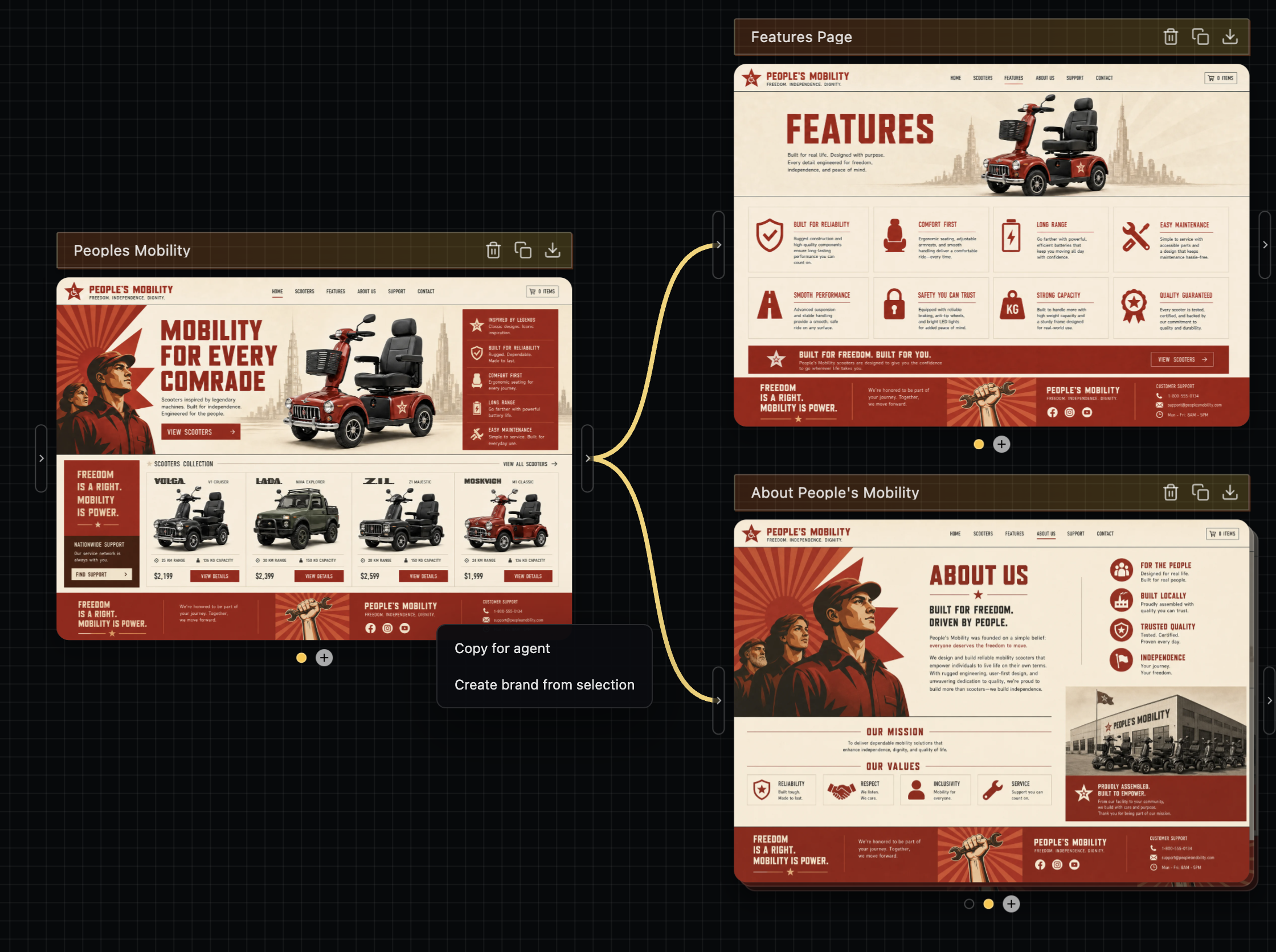
RE this one, I highly recommend doing image->code as the flow here. Codex's sites feature is doing this under the hood - it's rendering an image first with gpt-image-2, then building from it as a reference.
You can use gpt-image-2 directly for this, though if I can plug my own stuff diffui.ai it's exactly what I made this for. It'll make it easier to do multi-page flows with the same style easily, then you can hand off the designs to your agent, ie https://image.non.io/6e1f98ad-4c79-4735-9932-b0d5cca9be98.we...
Claude Code, Codex, Pi clis all for varying levels of work. VS Code when needed.
I review agent messages, some specs/plans, and conduct local code reviews with Plannotator [1].
For skills, I have a bunch of custom ones for my own workflow. and for public skills I really only use the interrogate skill from cursor's lauren [2].
Key workflow stuff:
- Almost all work I do gets done in a git worktree.
- ghostty + Mac OS gives me all the organization I need for multi-agenting
- turn off all agent memory, this has only ever caused problems for me.
[2] https://github.com/cursor/plugins/blob/main/pstack/skills/in...
I banged out a simple FastAPI endpoint/tool (along with dockerization and deployment) and a media-heavy Astro website (along with Cloudflare Pages publishing) in Google's Antigravity2.
https://antigravity.google/product/antigravity-2
Not really a recommendation since I don't have a good benchmark of these tools but Antigravity's /grill-me feature where it asks you a bunch of questions like a system/business analyst and gives you an implementation plan for review (and can actually change it further) is pretty cool and it is certainly fit for what you intend.
Heard also good things about Zed and am testing it right now. So far I managed to... edit a json.
I've spent 2 weeks (2-4h per day) to make D language[1] version of Sciter SDK [2]
Choice of AI "tooling" was by accident - typed something like "how to define copy constructor in D for custom structure" in Microsoft's Copilot in Edge browser that gives context for AI.
The answer was good enough for me and so I went with it further.
[1] D language HQ : https://dlang.org/
[2] AI-Assisted Development with D Language, Creating Sciter SDK: https://terrainformatica.com/2026/06/05/ai-assisted-developm...
My workflow for production code:
1. Pick the most complete project boilerplate (fullstack JS can easily introduce security bugs, SPA + API is best as cheap linting solves most problems)
2. Project skills (how to CRUD without mess)
3. Use worktrees for concurrent features, local session for conflicts
4. Local session for QA and refinement
I use Copilot and GPT 5.4
Managed to shorten pre-AI priced ongoing projects to 2 weeks or a month
Recently ditched VSCODE completely and switched from development on local machine to remote "vps" cloud.
Currrent setup:
Zed + Terminal threads (love this!) + Remote machine
Devcontainers + Claude + Pi
[1] Zed https://zed.dev/
[2] Terminal threads https://zed.dev/blog/terminal-threads
[3] Pi https://pi.dev/
As sort of byproduct also replaced Alacritty + Zellij (i just don't have the need to use more, 3 weeks of new setup)
DeepSeek and Mecha-AI as CLI coding agent for general architecture [1]
Sublime Text and a DeepSeek plugin for file by file cosmetic fixes
Nothing else. With these tools I am building apps like never before in minutes instead of months
I wrote my own tooling around the raw LLMs:
I can tick files in Vim, those get concatenated into a prompt. Along with a feature request. Plus an instructions file that tells the LLM how to reply. Plus my general "rules for good code" file, plus one "rules for good code" file per language involved, plus a project specific overview file. The LLM then answers with a list of changes it wants to make to the code. My tooling then applies those changes and I look at them via "git diff". If I like it, I commit. If not, I change one of the prompts and start the process again.
Instead of replying with code changes, the LLM can also decide to request more files. I wrote a little DSL for that.
I described the beginnings of this workflow last July:
https://www.gibney.org/prompt_coding
Feels like an eternity ago. I think I will write a new blog post this July and describe how the workflow has evolved over the past year.
Opencode & mixed LLMs
1) Write half pager of markdown by hand - tech, architecture, features
2) Ask 2-3 LLMs from different companies to review for gaps & problems
3) Make LLM turn it into implementation plan with emphasis on modular phases
4) Repeat step 2 but on the implementation plan. Usually the 3rd LLM just goes yeah that looks fine
5) Walk through phases individually, sometimes multiple in one shot depending on vibes. Sprinkle more 2-3 other LLM checks in between again depending on vibes & judged difficulty
My usual workflow is GPT-5.5 for planning, DeepSeek V4 Flash for milestones implementation, then GPT-5.5 again for review. It has worked pretty well so far.
Something different that other folks might not have thought of: Robust multi-environment infra deploy scripts that leverage terraform + AWS SSO
I've found that converting stuff that's previously been very ops-cli heavy into very detailed skills has worked really really well.
I use Claude Opus 4.8 + Conductor as my daily driver
I would not try to mix newbies in with experienced software developers.
Pick one audience at a time and approach it that way.
For a newbie, something like Replit free tier might be the way as there is little cognitive overhead to getting setup.
For a experienced developer, having them get a $20 sub and work on one of the popular agent harness.
Lead Dev for a Security Company with a very strict AI policy.
Mostly Hand coded, using an agent in the browser (Claude / Corporate ChatGPT account) when necessary. I am aware we will fall behind using this methodology and have advocated for change, but I suppose it comes with the territory.
Stanford University offered the course "CS146S: The Modern Software Developer" in Fall 2025. Check it out if interested. https://themodernsoftware.dev/
I like Zed...
but AI dev workflows get complicated fast
you start with claude code or codex and it's cute, but then you realize - hmm configuration is cheap, the AI can do it!
then you start looking into MCPs and skills, fuck it, oh-my-pi looks awesome!
wait a second? I can just have AI make my own personal AI harness! Next thing you know, you're writing the 5th version of "little-coder" or similar using the Pi library
ahh shit, you just read an article that `tools` are actually crazy important for AIs, using `sed` is dumb when `hashline` + ASTs are way better, lets just start writing our own tools!!
...anyway I just use Zed, simple agent on the left, code on the right
i have some pretty complicated automated workflows that use `linear` + a orchestrator -> implementer -> reviewer -> releaser workflow, but it's less a dev stack and an AI factory
I have a vibe coded script which creates a git worktree + zellij pane with a specific layout + a virtualenv per feature. "tmuxinator" style.
The zellij layout includes panes for OpenCode, a shell, a neovim, inotify tests, etc.
I cycle through the zellij sessions during agent prefills.
I did a similar workshop between Feb-April (1 hour zoom call on Wednesday, 3 hour hands-on in person every week)
Most of the participants has Windows laptop. (Except one with Mac)
We had suggested Linux on WSL2 and VSCode. (`uv` for python package management)
But realized that we were spending a LOT of time fighting the tools/combination. WSL2 + Windows filesystem + uv did not work well together.
For person with macOS - it was smooth sailing
If I do another batch, we'll use native `pip` and python (not uv) and I think then we won't need WSL2
virgin project:
1/ spec driven dev (https://github.com/github/spec-kit)
2/ then degrade to multiple sessions (no worktrees) debugging various problems until its done
On UI Design (MacOS, Web):
1/ AI does a first pass. Try to give it style guidance on my own (colors, style, etc).
2/ Prompt ChatGPT.com with screenshots and ask for recommendations on how to make it better.
3/ Codex the changes (with minor edits)
4/ loop 2-3, ask Gemini for feedback too
I use PI ( https://pi.dev ) and ( https://hermes-agent.nousresearch.com/ ) as the main drivers together with deepseek-v4-pro as the main model (~10M/day tokens overall there).
Hermes basically rules my personal life at this point - it is a _very_ useful personal assistant.
I also use it at work (integrated at Slack) and at this point it answers most of both my emails and slack messages (I calibrated https://github.com/blader/humanizer with a large corpus of my own voice to make it less annoying for the others). My routine now involving walking in circles while exchanging messages with hermes directing it how to answer this or that... Hermes uses an llm-wiki ( https://gist.github.com/karpathy/442a6bf555914893e9891c11519... ) as a source of information when drafting suggested replies - I have a cronjob that feeds it all emails, slack messages, meeting minutes every single day.
Claude Code with Opus 4.6 for multimodal/vision, design and writing tasks ("Create a crisp memo from this meeting transcription" is a prompt that will bring great results with either Opus 4.6 or GLM-5.1) - very recently I started to use https://github.com/anomalyco/opencode occasionally with opus models too (I am forcing myself a little bit because it is hard to help people with a tool you are unfamiliar with).
For building software automatically I currently use one of the harness above for for launching https://tamandua-tetradactyla.nfshost.com/ feature-dev-merge-worktree runs (it provides workflows on top of PI+deepseek).
Where it comes from: until recently I used https://steve-yegge.medium.com/welcome-to-gas-town-4f25ee16d... for automatic software building but while planning an AI bootcamp I concluded that teaching Gas Town along with everything else would be impossible (too hard/complex), and decided to teach https://github.com/snarktank/antfarm instead but did not want to add OpenClaw as one more dependency - so I built Tamandua ( https://github.com/igorhvr/tamandua ) and I ended up using it all the time! I now every single day before going to sleep launch a couple of runs and it is very cool waking up to see them done.
For autoresearch-like, optimization, and other tasks with a very clear measurable goal (such as increasing test coverage, changing things from one programming language to another, etc) I use https://github.com/davebcn87/pi-autoresearch (100% of the time on top of deepseek-v4-pro).
For debugging or very hard problems I use codex w/ GPT5.5. I don´t like its personality (lazy) but I do think it is smartest model available. As evidence, here is a commit of a problem where I tried Opus 4.8, Deepseek-v4-pro and a couple of other models and they all failed to understand what the bug was: https://github.com/NousResearch/hermes-agent/pull/38198/chan... - once the bug was found within codex I launched from it a tamandua bug-fix-merge-worktree run on top of deepseek-v4-pro that created the commit itself...
As a web application I use OpenWebUI and I am specially fond of the notes feature ( https://docs.openwebui.com/features/notes/ ) which I did not find anywhere else.
Last but not least, I love playing with local models. https://huggingface.co/Qwen/Qwen3-Coder-480B-A35B-Instruct is my current favorite for coding and deepseek-r1 for general tasks. I also started yesterday testing https://github.com/antirez/ds4 - it works _very_ well from what I could see so far.
What comes next? Trying to figure out what is the "deepseek-v4-pro of multimodal" model (frontier performance, efficient/comparatively cheap to run, support for image/audio/video/etc). Currently using kimi-k2.6, will test Minimax M3 soon.
Ah, almost forgot: https://huggingface.co/microsoft/VibeVoice-ASR will give you AMAZINGLY good meeting transcriptions (my hermes vibecoded a program to use it). Seriously, night and day difference from what the big players provide natively in their platforms. Have 8 people talking in 3 different languages? No problem - you will need a bit of patience and beefy hardware, only..
Claude code + very opinionated type script. Try to push as much as possible as far left in the SDLF (types -> lint rules -> tests -> md) and try to improve the dev ex after every single PR.
Self made TUI that just lists LXC containers.
I have a base container.
"A" to make a new instance.
Pi.dev when I hit enter on any container. Hot swap anthropic enterprise and openai and openrouter as needed.
Every container has the dev env already running for my current projects. Iterate, rarely use vim when needed, spec driven and have llm draft prs for me then I review.
I know the codebase in and out so what I want done is on bypass mode and then I review closer at the draft PR step before marking ready for the team.
I am like you were late to the AI party, and still find it hard to give up on coding and let the AI do everything, however i learned to trust the AI a little in the past few months.
If you are teaching newbies, just get them into the Claude Code or Codex desktop apps.
For devs:
Claude, Codex and Cursor. All on the $20 subscription.
Then use Conductor for worktrees w/ Claude/Codex for mid-size tasks and code review.
Cursor for manual or small changes w/ Composer 2.5.
Claude Code and/or Codex from Ghostty/Terminal. You don't need to complicate it.
a tmux session where every window is a claude code instance in a different checkout of the repo
and then an MCP+Channels system that let’s the claudes DM each other
plus the Telegram channel so one of the claudes can talk to me over text message
So many random methods and tools - so much time wasted.
Don't want to jeopardize this awesome chat about tools but for AI workshops I think these visual cards I came across could be an amazing way to handout. They cover all LLM concepts and explained visually. Found very useful to revise LLM concepts before AI research scientist/AI engineer interviews.
Use whatever terminal you want.
Use claude or codex cli as architect.
Use !architect-model as actor.
Use local model for scout, extraction, etc.
Read recent AI research in arxiv.
Build a system that suits your workflow based on these principles: executable verification is king, independence is mandatory, a zero-failure report is a claim to be audited, not a result to be celebrated.
Now AI Just Works™
MacOS, Ghostty, Neovim, Pi (with a fair bit of customization to each). I'm relatively new to Pi after using Codex pretty heavily, but it's nice to be able to customize things to how I want.
ChatGPT, request minimal necessary diff to make a specific change, review, ctrl+c, ctrl+v
Wrote up my approach recently in a blog post:
- https://blog.isquaredsoftware.com/2026/05/ai-thoughts-part-2...
TLDR:
OpenCode + CodeNomad web UI, Opus 4.6, bunch of customized plugins and some codebase indexing MCPs, a separate `dev-plans` repo for generated project docs and artifacts, and a personal workflow where I stay very hands-on directing the work.
also I wrote a lengthy post detailing my emotional and mental journey from "I will _never_ use AI to write code" to actively using it, as well as my opinions on where we stand now and whether this is actually any good or not:
- https://blog.isquaredsoftware.com/2026/05/ai-thoughts-part-1...
I use VSCode, Claude Opus 4.7, github work trees to work on multiple projects. At most I work on 3 projects a day. More than that and I start hallucinating myself.
Currently using Arch Linux with VsCode and as server, I am currently going for vercel for no cost.
My stack is really boring, just VSCode + Ghostty and Claude Code team plan (premium seat).
I feel it’s important that this should be mentioned at least once in a thread like this: none. I choose to program the old-fashioned way, and do not anticipate this changing in the foreseeable future, and believe that I’ll cope just fine in my niche; and if it becomes commercially unviable, well, I may no longer be interested in the field anyway.
I won’t go into any details on why here, because that would make it too much about me. There have been plenty of discussions of reasons, trade-offs, &c. Plenty of people are rejecting this stuff, for a wide variety of reasons.
But one thing I will say: if I were teaching someone to program, I would actively discourage them entirely from using AI stuff, even though it will seem to help. (I mean someone that wants to learn programming, not someone that just wants results and is not interested in programming as such.)
I am using Spec Driven Development approach implemented as a Claude Code plugin since Feb for all mid + size tasks. The idea is to write detailed specs first using agent help doing research and interviewing, decompose the task into smaller subtasks, write detailed spec for each task, implement each task separately. You can restart the session after every step in the workflow and after each subtask implementation since all requirements are materialized in specs. This helps to keep session context focused on a single task at time, improve adherence, reduce cost and allow to implement bigger tasks that are hard to implement with pure plan + code.
Discussion on hn: https://news.ycombinator.com/item?id=48231575
Repo: https://github.com/sermakarevich/sddw
Slides: https://docs.google.com/presentation/d/1SjKXF7hkoqyiN9-3tBGY...