 alt Hacker News
> Any power users who prefer their own key management should follow the steps to enable Bitlocker without uploading keys to a connected Microsoft account.
Except the steps to to that are disable bitlocker, create a local user account (assuming you initially signed in with a Microsoft account because Ms now forces it on you for home editions of windows), delete your existing keys from OneDrive, then re-encrypt using your local account and make sure not to sign into your Microsoft account or link it to Windows again.
A much more sensible default would be to give the user a choice right from the beginning much like how Apple does it. When you go through set up assistant on mac, it doesn't assume you are an idiot and literally asks you up front "Do you want to store your recovery key in iCloud or not?"
Replies
Why would you need to create a local account? You can just not choose to store the keys in your Microsoft account during BitLocker setup: https://www.diskpart.com/screenshot/en/others/windows-11/win...
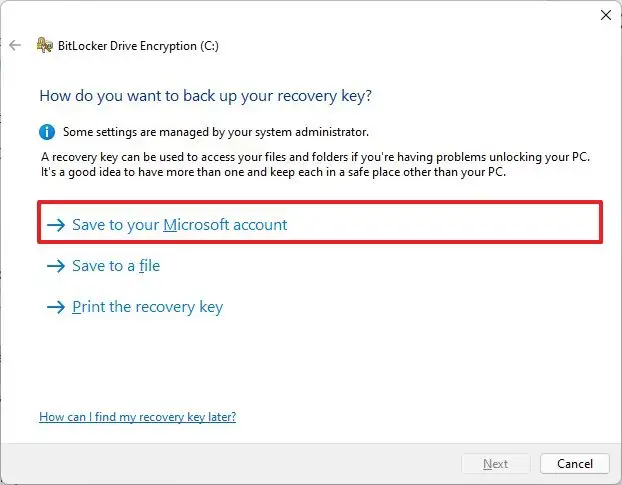
Admittedly, the risks of choosing this option are not clearly laid out, but the way you are framing it also isn't accurate
You can turn it off without resorting to a local account, although it's non-obvious.
GPEdit -> Computer Configuration → Administrative Templates → Windows Components → BitLocker Drive Encryption → Operating System Drives → “Choose how BitLocker-protected operating system drives can be recovered”
Repeat for other drives.
With Bitlocker it is still possible to have single password-based key. But enabling that requires to enter a few commands on the command line.
They don't do that for iMessage though... https://james.darpinian.com/blog/apple-imessage-encryption
>Except the steps to to that are disable bitlocker, create a local user account (assuming you initially signed in with a Microsoft account because Ms now forces it on you for home editions of windows), delete your existing keys from OneDrive, then re-encrypt using your local account and make sure not to sign into your Microsoft account or link it to Windows again.
1. Is there any indication it forcibly uploads your recovery keys to microsoft if you're signed into a microsoft account? Looking at random screenshots, it looks like it presents you an option https://helpdeskgeek.com/wp-content/pictures/2022/12/how-to-...
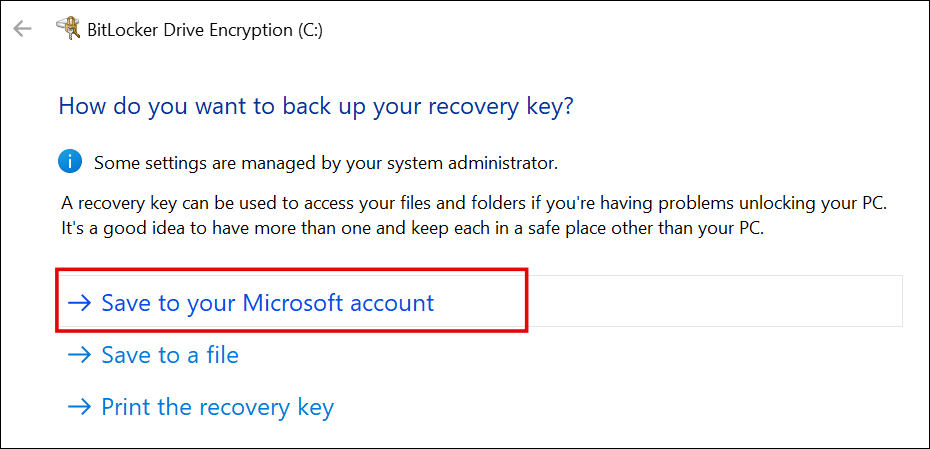
2. I'm pretty sure you don't have to decrypt and rencrypt the entire drive. The actual key used for encrypting data is never revealed, even if you print or save a recovery key. Instead, it generates a "protectors", which encrypts the actual key using the recovery key, then stores the encrypted version on the drive. If you remove a recovery method (ie. protector), the associated recovery key becomes immediately useless. Therefore if your recovery keys were backed up to microsoft and you want to opt out, all you have to do is remove the protector.
> make sure not to sign into your Microsoft account or link it to Windows again
That's not so easy. Microsoft tries really hard to get you to use a Microsoft account. For example, logging into MS Teams will automatically link your local account with the Microsoft account, thus starting the automatic upload of all kinds of stuff unrelated to MS Teams.
In the past I also had Edge importing Firefox data (including stored passwords) without me agreeing to do so, and then uploading those into the Cloud.
Nowadays you just need to assume that all data on Windows computers is available to Microsoft; even if you temporarily find a way to keep your data out of their hands, an update will certainly change that.