 alt Hacker News
As a Windows user, it's a surreal way to install a program
Comments
When I first got a Macbook, I tried installing an app and had no idea what to do once I saw the app icon, arrow and Applications folder with no additional instructions. I didn't figure it out and had to look it up. For an ecosystem praised for its "user friendliness", this was certainly not the best first impression.
FYI - You don't have to drag the app to the applications folder in the install window.
You can drag the app to a different location. I have an entry level mini 8GB/255 GB SSD with 1TB external SSD. Everything goes on the external. There are only a handful of apps that insist on being installed in the system Application folder. Even had xCode running on the external.
Uninstalling is supposed to be as simple as moving the app to trash but often that leaves a load of stuff behind that no one tells you about.
Counterpoint: as a Mac user it is surreal to click Next Next Next to install a program on Windows.
Same for uninstalling. Move to Trash and poof, unistalled.
There is no standard way to install stuff, so neither MacOS nor Windows deviates from something. For all the bickering about it here in the comments, no one proposed an “ideal” solution to install a program on Mac.
I think that if every app has to explain to the user how to use their own operating system, that operating system is not intuitive. I’ve been using Macs for a long time but I had to look up how to install an app the first time I did it.
The dmg thing makes no sense. I do like that the app is self-contained, unlike Windows where it's always an installer, but don't like how deleting the app doesn't clear whatever files it put all over the place.
I'm just glad I'm not the only one who says damage in their head for .dmg files
I'll be honest given the article title I was hoping for a detailed rant on the complex installation process that most Windows apps hide, but this was also a nice read. And as a user of Raycast they do indeed have a very nice installation background.
There are some amazing graphics here. These are images users would see very rarely: usually only on the initial installation. (A Sparkle app update would usually run for the rest of the app's lifetime.) The amount of care and polish put into something the user would see only once really shows the change in attitude around apps and UI on the Mac today.
macOS is on the surface the same. But seeing this causes a feeling of a deep gulf. How can we or Apple regain it? That special sense of value and care in the OS and its app developers?
That Squirrel screenshot is fascinating: what happened to the traffic light controls?
https://unsung.aresluna.org/_media/as-a-windows-user-its-a-v...
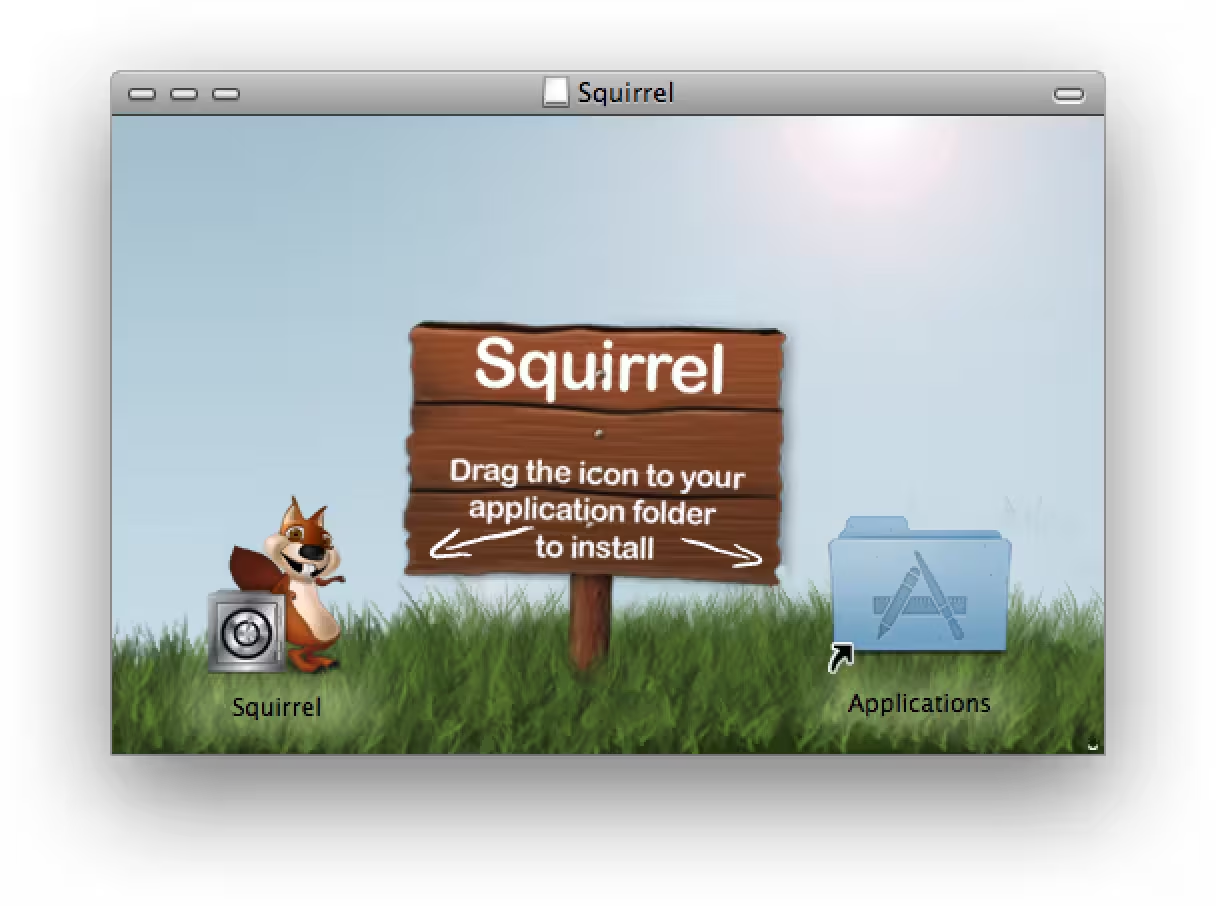
It's a disk image, because in the old days, you'd install apps by dragging them from a floppy or CD to the Applications folder.
I might be in the minority, but for me the best way is installing with a cli (like homebrew or winget on windows).
A UI way to install is only a fallback.
Why not .pkg (next, next, installer)? For the past week, I've been tweaking my startup's CLI to install as a .pkg, satisfy Apple signing, and everything that goes along with that. I've often wondered why so many companies opt for the icon method.
I've been using a Mac for 4 years. I still just want a nice simple install button.
I'll never forget the first time that dreadful window appeared. I was frustrated for 10min, eventually turning to my phone to search for what to do.
It makes more sense if one thinks of the disk image files as digital analogues to thumb drives, optical discs, etc.
In the Classic Mac OS days a decent chunk of software (especially shareware/indieware) didn't have an installer and was just a folder you copied from a floppy disk or CD, which this process kinda mimics. You're just opening a file instead of putting in a disc.
It's fine for installing, but uninstalling is madness: Windows uninstallers try to clean up all the registry and user profile stuff they install. Mac apps seem to just leave stuff behind in Local Settings or Caches forever? Containers are not such a bad idea.
I’ve always appreciated the effort and creativity developers put into making this a good experience, and a learning experience for new users. After all, you never know which app will be someone’s first install. A well made dmg was how I learned to install apps on OS X when I first moved to it 23 years ago.
Some developers have gotten lazy with this and expect users to just know. As a result I’ve seen many people running an app out of the dmg file itself for a long time, then they wonder why they have a bunch of stuff mounted.
This is one of my favorite things with the Mac. I feel it is very intuitive me moving the app to Applications, then just move it to trash if it sucks and it is completely gone.
setup.exe .pkg installers make me feel dirty because I hav enough control over how it will fuck up my system or not.
A long while ago I found myself helping out with some products MSI installer. I don't think anyone can really point a finger at the Mac and accuse it of having issues by comparison with what seemed to me to be the nightmare from hell of trying to make an installer that would work on various versions of windows.
It's not the fault of MSI per se, although its concept seems utterly frightful to me, but the way DLLs work and are registered and where you have to install them etc. When your app requires an older or newer MSVCRT etc. Also...the registry...something else that makes good old UNIX text file editing seem good to me.
I always thought that libsomelibrary.so.MAJORVERSION.MINORVERSION with symbolic links from libsomelibrary.so.MAJORVERSION and libsomelibrary.so allowed one to create dependencies that made sense - more or less specific as you chose. It also allows different versions of the same library to exist in the same directory such that one is less likely to break existing software when installing something newer (or older).
To be fair it might just be the way Windows tries to keep compatibility for the ages that makes it super difficult. I do think that you tend to get similar outcomes from similar assumptions/requirements and compatibility was indeed very very important till the internet became good enough to offer everyone easy upgrades.
I'm not a big snap or flatpack fan but DMG seems rather in their class - making things simpler. It might be easy to run an MSI after someone has burned many hours testing it to get it to work everywhere but to me it's a non-simple architecture that is made to work by extreme effort. I'd rather a simpler architecture that open source packagers could manage more easily.
As an example, I tried creating an Ubuntu package recently - a plugin for GNU Make that adds some useful functions.....that was SO hard - worse than any MSI experience I ever had - and I gave up. There were millions of confusing instructions and none worked properly. I couldn't work out which way was up or down - I don't know how people do it.
On Artix (an OS which is a little harder to install than Ubuntu) it is an absolute dream to create packages - exceedingly so. It might be that they aren't the greatest packages in the world but something that can be developed easily and got working can also be improved easily.
Is the quote in the title a reference to something?
You get the program image from the web and you move it into your folder holding application?!
Having some custom wizard that's never the same fuck up your entire windows registry, write to wherever the fuck it wants on disk, now THAT is surreal
This is a nice little archive of all these different installers.
I’d almost forgotten about all this madness since I’ve been using homebrew to install stuff for over a decade
Yeah I remember the first time I had to figure this out. Absolutely incomprehensible, depending on the app you get. A lot of open source apps don't bother with a custom background and just have the two icons. Even if there's an arrow it's hardly clear if you're used to saner installation methods.
For a company that is supposed to be all about ease of use, this one is absurd.
And if you're wondering what Apple should do, if a .dmg file contains only an app and a link to Applications (or maybe some new flag set), when you double click it it should say something like "Do you want to install this app [Install] [Inspect disk image contents]". Very very simple.
No one will ever convince me that the Mac approach for installing programs is intuitive or good UX. The whole argument of: "But if you think about it in ... way, it makes sense" is a terrible argument.
It's truly a terrible UX decision that Apple's left in place because of apathy. (And presumably thinking someone wants to install software through the Mac App Store!?)
They should offer a first-class way of "installing downloaded apps" and push developers to use it. I would say use an Installer package but I can't remember if there's issues with it not being a single file. So a zipped installer package. And then make that not have an unnecessary 12 step wizard.
Oh, that's an article on macs. It's actually surreal to require a manual action to install a program.
I think the most confusing concept in this process for new users is the shortcut inside the disk image because it breaks the isolation metaphor.
So, you download a file, and it's something called an "image" which opens in Finder like you'd inserted an external thumb drive. Fine. You open the image, and inside is... Your own Applications folder? Wait, how can the file I downloaded contain all of my apps?
This kind of indirection is natural to developers and other advanced users: the file you got from the internet doesn't really know about your Applications, it's a link to a generic system location that gets resolved by Finder. But for less advanced users it's oddly circular: this virtual disk that came from the internet has my data in it. It's something that never happens with an actual thumb drive.